How the speed of your equipment has a major impact on action shots.
For starters, your lens must support fast and accurate autofocusing. Then the camera comes into play with the data processing speeds of the image sensor and image processor(s). The write speeds of the memory cards on which the images are stored completes the capture process.

The Canon EOS R6 Mark II camera and 35mm lens, used by photographer Alex Moysan to record this action shot of a cycling peloton, were as fast as you could get at the time the shot was taken. Nonetheless, fast memory cards were essential for securing the shot. © Alex Moysan.
Lens focusing
Three factors dictate the autofocusing (AF) speed of a lens: the drive motor that adjusts the position of the focusing element(s), the size of the lens aperture and the data processing systems in the camera, and lens hardware and firmware. Focusing itself is a straightforward process: the camera detects the distance to the subject and passes this information to the lens, then the processor in the lens adjusts the optics to bring the subject into focus.
How quickly this occurs depends on the focusing method and available light levels. Traditionally, contrast detection (CDAF) – where the lens is moved to establish the greatest contrast between adjacent pixels on the sensor – has been popular with camera manufacturers. Phase-detection AF splits light entering the lens into pairs of images and compares the intensity differences (peaks and valleys) between the pairs.

Focusing on the main subject in this shot required the use of both contrast detection and phase detection AF, with the bright, reflective surface of the water adding further complications to the challenges of keeping the subject in focus.
Phase detection AF (PDAF) can quickly detect whether the subject is near or far and calculate how far to move the lens. Today most cameras use a ‘hybrid’ system that uses on-sensor PDAF points for quick initial focusing and tracking, then switches to CDAF for fine-tuning of sharpness. This combines speed with precision and is ideal for sports photography.
Unfortunately, some things can slow autofocusing performance. The most common is dim, low-contrast lighting, which can cause the lens motors to drive the focus back and forth as the camera ‘hunts’ for a sharp edge.
Highly reflective surfaces (like water) or subjects with dense, repetitive patterns can confuse the AF sensors, making it hard for the camera to isolate the target. The type of drive motor the lens uses also plays a role in lens speed.
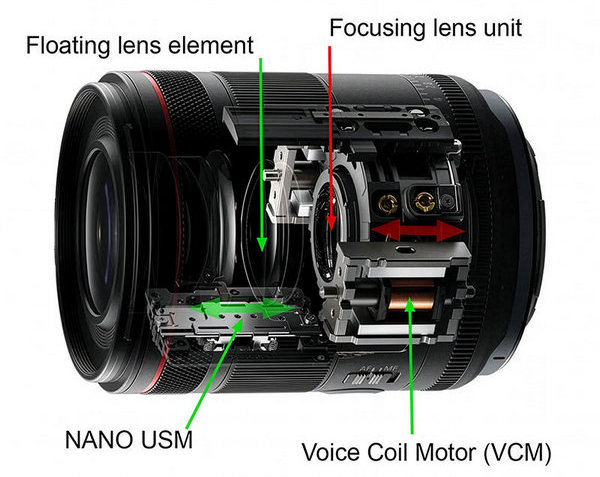
Shows the structure of the electronic focus control mechanism, in which a VCM (Voice Coil Motor) does the heavy lifting of moving the focusing lens group while the compact, energy-saving Nano USM adjusts the lightweight floating lens to fine-tune the focus. (Source: Canon.)
Most lenses use one or more of the following types of drive motor:
1. Stepping (or stepper) motors (STM) physically move the focusing elements in small, precise increments.
2. Ultrasonic motors (USM) use piezoelectric elements to convert vibrational energy into rotational motion, which moves the focusing elements.
3. Linear motors move the focusing elements in a straight line using electromagnetic fields.
4. Voice Coil motors (VCM) use a magnetic field to drive the focusing elements.
5. Screw/gear type AF systems use a simple motor in the camera body or lens that turns a screw to move the focusing elements. (This type of AF drive is seldom used in modern lenses because it’s not fast enough.)
Ultrasonic motors (USM), linear motors and Voice Coil motors (VCM) are the fastest. Canon’s ring-type USM is often cited as the fastest and most robust, with Tamron’s VXD (Voice-coil eXtreme-speed Drive) linear motor a close competitor.
While high speed is important, smooth and quiet operation is also critical for video. Nano USM and VCM can provide this smooth, silent performance alongside fast responses for video capture.

Regardless of what type of autofocusing system your camera uses, it is always easier to focus on subjects coming straight towards you than those moving across your field of view.
Camera speed
The speed and efficiency of image processors usually increases with each successive generation. This is another advantage of having a recently-released camera. Developments like stacking the electronics behind the image sensor and boosting data offloading speeds make the sensors and processors in the latest cameras much faster than before.

Additional processors, like the DIGIC Accelerator chip in Canon’s professional cameras, significantly increase image processing speeds. (Source: Canon)
You’ll need these speeds to support high-speed continuous shooting of high-resolution photos and video recordings. That requires fast, high-capacity memory cards.
Check the specifications list when you’re shopping for a new camera and, if in doubt, ask the staff member who is serving you whether the camera’s processor is the latest model. But remember, it’s only one component in the imaging chain; the memory card(s) your camera uses can determine whether it utilises the focusing speed of the lens and the camera’s data processing speeds.
Memory cards
Your camera dictates which type(s) of memory cards you can use. Lower-priced and older cameras usually have a single media slot for SD (Secure Digital) cards.
SD cards come in three capacity levels: Standard SD cards go up to 2GB; SDHC (High Capacity) cards range from 4GB to 32GB, and SDXC (Extended Capacity) cards go from 64GB up to 1TB (and maybe higher in the future).
Many cards show ‘Class’ numbers between 4 and 10, ‘V’ ratings (typically V60 or VB90) and/ or the number 1 or 3 inside the letter U. The class numbers refer to the card’s minimum-rated sustained write speed. Class 4, 6, or 10 cards should maintain speeds faster than 4, 6, or 10 MB/s, respectively.
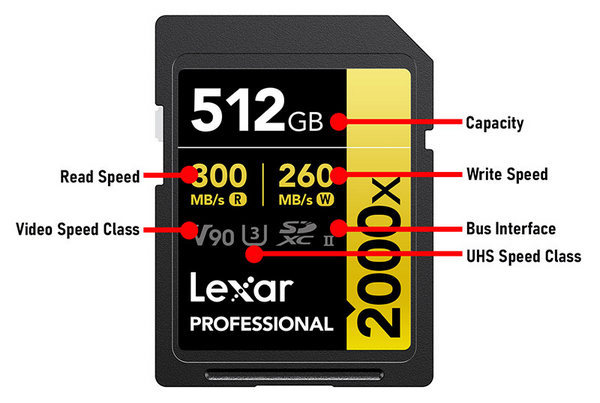
Shows the information you can use to evaluate the performance of an SD card. (Source: Lexar.)
The V rating denotes video write speeds. V60-rated cards have a minimum write speed of 60 MB/s, while V90-rated cards have a minimum write speed of 90 MB/s.
SD cards are also split into three UHS speed classifications. Cards without a UHS rating have a maximum speed of 25 megabytes per second (MB/s). UHS-I cards max out at 104 MB/s, and UHS-II cards have a second row of pins on the back that helps to achieve speeds of up to 312 MB/s.
Recently-released cameras that support high-resolution video (at 4K/60p, 6.2K or 8K resolutions) often have two media slots, one for SD cards (usually SDXC UHS-II) and the other for CFexpress cards, which are faster and generally have higher maximum capacities. Some may have two SD slots, while others accept two CFexpress cards. While all CFexpress cards are based on a standard developed by the CompactFlash Association, different camera manufacturers have adopted different CFexpress formats.
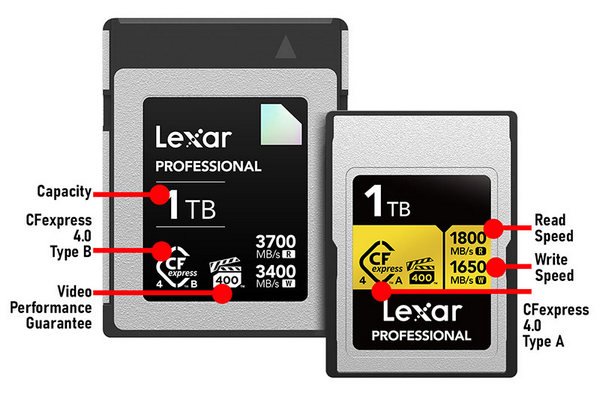
CFexpress Type A cards suit Sony cameras and lightweight setups; while Type B delivers higher 4.0 performance and wider camera support. (Source: Lexar.)
Sony cameras use CFexpress Type A cards, which have a similar form factor to SD cards but measure 28 x 20mm and are 2.8 mm thick. This lets Sony make cameras with slightly smaller, lighter bodies and offer the convenience of media slots that can accept both CFexpress and SD cards.
All the other manufacturers so far use the larger, Type B format cards, which are roughly twice as fast as Type A cards. They measure 38.5 x 29.8 mm and are 3.8 mm thick and are available in a wider range of storage capacities. They are better at high-speed data writing because they have more pathways (PCIe lanes) for transferring data.
Currently, the highest storage capacity for CFexpress Type A cards is 1.92TB, whereas Type B cards are available in capacities up to 4TB. The table below shows typical storage capacities for image and video files.
| Capacity | Approx. JPEG photos at 24MP | Approx. 24MP – uncompressed RAW files | Approx. minutes of 4K video (30 Mbps) |
Approx. minutes of 8K video (60 Mbps) |
| 1TB | 428,785 | 12,800 | 2,083 | 1,042 |
| 512GB | 214,286 | 6,400 | 1,042 | 521 |
| 256GB | 107,143 | 3,200 | 521 | 260 |
| 128GB | 53,571 | 1,600 | 260 | 130 |
| 64GB | 26,786 | 800 | 130 | 65 |
| 32GB | 13,393 | 400 | 65 | 32 |
| 16GB | 6,696 | 200 | 32 | 16 |
| 8GB | 3,348 | 100 | 16 | 8 |
Interestingly, SD and CFexpress cards handle data differently. With SD cards, the camera is entirely responsible for how the image data is transferred to the card. CFexpress cards have a built-in memory controller that manages how the data is stored in the card.
Technically, if something goes wrong, most images on an SD card can be recovered after write, deletion or storage cell errors. In contrast, with CFexpress cards, you can’t recover images once card structures are breached.
Most cameras that use CFexpress cards have large buffer capacities for burst storage, with the smallest raw file capacities typically being around 70-80 files and the largest around 1000 files. Unfortunately, CFexpress cards cost more than SD cards with equivalent capacities because the newer, faster technology involves higher production costs and more specialised components.
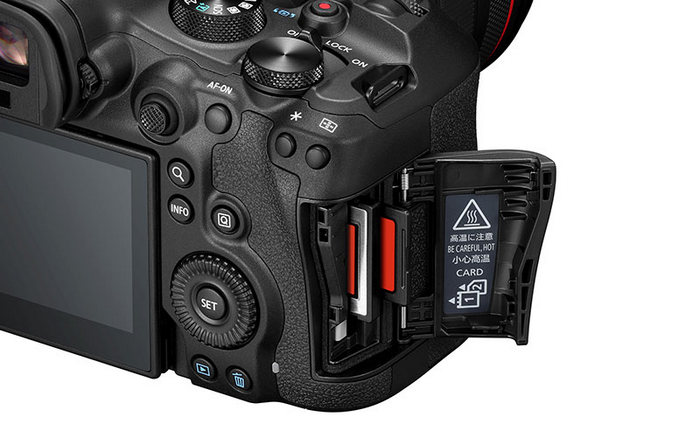
An increasing number of enthusiast-level cameras now provide dual media slots with one slot accepting CFexpress cards and the other SD cards. This enables photographers to use the faster CFexpress cards for storing high-resolution video clips and extended high-speed bursts of stills. (Source: Canon.)
If you really need the card speed and/or both speed and capacity for fast burst shooting or high-resolution video recording it’s usually worth the investment. But if you only shoot stills and seldom record fast bursts of uncompressed raw files, a CFexpress card could be over-kill.
If you’ve purchased a Sony camera you should be safe to use appropriate SD cards in the CFexpress Type A slot. They won’t be as fast as a CFexpress card but they may be fast enough for your requirements.
Making memory cards last
Follow these practices to ensure your camera’s memory cards remain usable over the long term:
1. Format the card in your camera before each use. This ensures the structure on the card matches what the camera thinks it should be.
2. Don’t share cards between cameras. The DCF specification triggers a sub-folder for each camera, which can make it more difficult to find the file you’re looking for.
3. Only delete files on your camera if you have to. Deletion is a different function from storing and can trigger storage problems.
4. Memory cards have finite life spans. SD cards are more vulnerable to cell write death than actively managed CFexpress cards. It’s good practice to buy new cards when you buy a new camera and retire your old cards at that point.
Battery capacity
While you’re checking the camera specifications for details of its image processor and the memory cards it uses, it’s worth scrolling down to check the battery capacity. Most cameras publish CIPA ratings, based upon standardised measurements conducted by the Japanese Camera & Imaging Products Association.
These involve taking a photo every 30 seconds with intermittent use of flash and lens zooming. All measurements are made with normal usage modes; energy-saving modes aren’t measured.
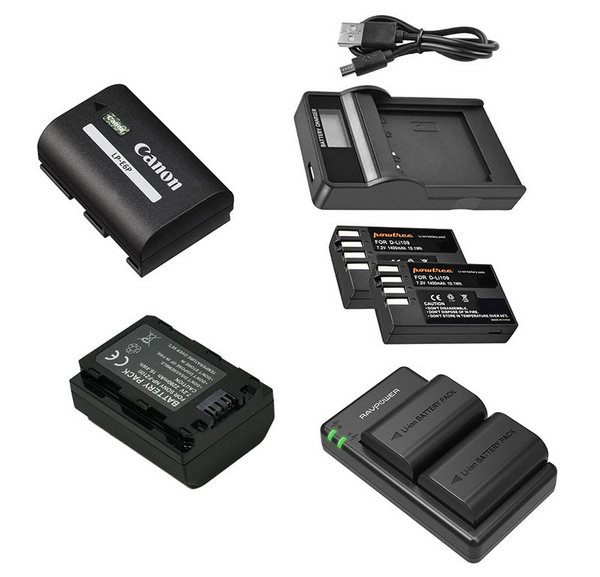
Camera batteries come in different sizes and capacities, with larger batteries offering better performance as a rule. With the increase in direct USB charging capabilities, few modern cameras come with separate battery chargers, although these can be handy when you have spare batteries to charge.
The CIPA ratings are a useful guide to comparing battery life between different cameras. However, they don’t necessarily relate to your real-world usage of a camera, where the actual battery capacity is influenced by factors like how often you review photos, use video features, or connect to Wi-Fi or Bluetooth. Use of functions like the electronic viewfinder (EVF), continuous autofocus, image stabilisation and built-in flash will drain the battery faster than the CIPA test accounts for.
Useful links
Workflow and backup (Courtesy of Lexar)
This article by Margaret Brown is an excerpt from Sports Photography pocket guide
Pocket guide Partners: Camera House and Lexar