Just released in public beta in Photoshop web and mobile, the new AI Assistant lets creators to interact through a chat-based interface to update image edits or receive step-by-step guidance for doing it.

The new AI Assistant in Photoshop lets you ‘tell’ the software what changes to make to images. (Source: Adobe.)

You can also ‘mark-up’ images to direct the software when inserting new elements. (Source: Adobe.)
Using AI Assistant in Photoshop is as simple as describing the edits you want; such as removing distractions, changing backgrounds, refining lighting or adjusting colour. You can then choose to have AI Assistant apply edits automatically or guide you step-by-step so you can learn along the way. In the Photoshop app, you can use voice input to request edits you want. Photoshop web contains a new AI Markup function (offered in public beta), which is powered by AI Assistant and available within the contextual task bar. AI Markup lets you draw directly on your image and add prompts to control exactly where changes happen.
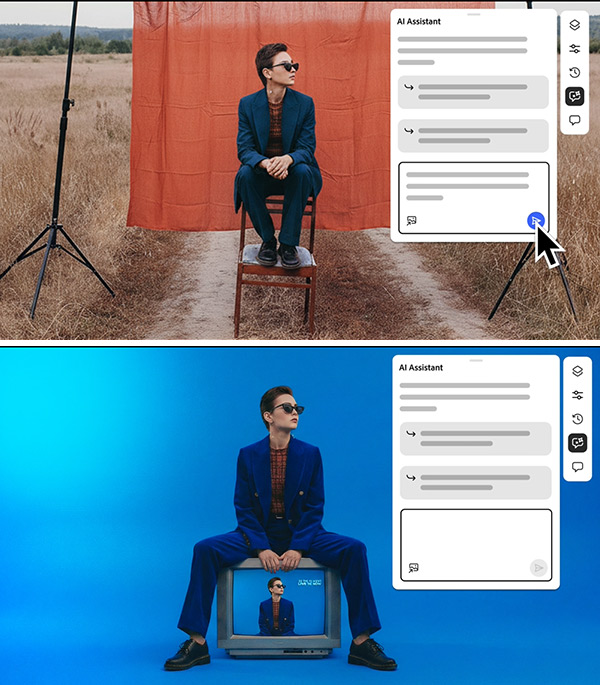
Firefly Image Editor makes it easy to replace backgrounds and introduce new elements with context-aware results. (Source: Adobe.
Adobe has also launched Firefly Image Editor, which brings five key tools into the generative AI system. From today the Firefly Image Editor includes:
- Generative Fill: Add, replace, or refine elements with context-aware results.
- Generative Remove: Quickly eliminate unwanted objects.
- Generative Expand: Seamlessly adapt images to new sizes and aspect ratios.
- Generative Upscale: Increase resolution and sharpen details.
- Remove Background: Isolate subjects with a click.
In Firefly, users can choose from more than 25 AI processing models, including Adobe’s commercially safe models, Google’s Nano Banana 2, OpenAI’s Image Generation, Runway’s Gen-4.5 and Black Forest Labs’ Flux.2 [pro] and also take advantage of unlimited generations in Adobe Firefly and when using AI Assistant in Adobe Photoshop web and mobile. Until 9 April, paid subscribers to Photoshop on web and mobile enjoy unlimited generations when using AI Assistant. Users of the free version of Photoshop on web and mobile are limited to 20 free generations.
According to Adobe, these new features provide greater flexibility for creators to transform their images across a wide range of genres, from fashion to home activities and designs. They also make it easy to streamline multi-step edits. Click here for more information.